Action
Sets the available space for the Hardware stack.
Syntax
$HWSTACK = var
Remarks
Var |
A numeric decimal value. |
While you can configure the HW Stack in Options, Compiler, Chip, it is good practice to put the value into your code. This way you do no need the cfg(configuration) file.
The $HWSTACK directive overrides the value from the IDE Options.
It is important that the $HWSTACK directive occurs in your main project file. It may not be included in an $include file as only the main file is parsed for $HWSTACK. $HWSTACK only accepts numeric values.
The Hardware stack is room space in SRAM that is needed by your program. Each time you call a SUB or FUNCTION, or use GOSUB, the processor need to know at which address to return after returning from the call. Also for RETURN Address after Interrupt this is needed by the program. For this purpose, the processor saves this address on the hardware stack.
When you use GOSUB label, the microprocessor pushes the return address on the hardware stack and will use 2 Bytes for that. When you use RETURN, the Hardware stack is popped back and the program can continue at the proper address. When you nest GOSUB, CALL or functions, you will use more stack space. Most statements use HW stack because a machine language routine is called.
The Hardware Stack is growing top down. The Hardware Stack start at the highest available SRAM Address and therefore is located before Software Stack and/or Frame.
See also
$SWSTACK , $FRAMESIZE, Memory Usage
Example for using an Interrupt and examine Hardware Stack:
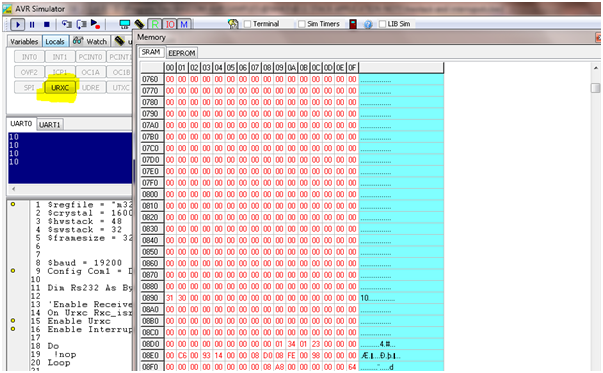
With the following example we just define and enable the Receive Interrupt of the UART and examine when clicking on Interrupt button within the Bascom-AVR Simulator Interrupts Tab how many Hardware Stack is needed.
$regfile = "m328pdef.dat"
$crystal = 16000000
$hwstack = 48
$swstack = 32
$framesize = 32
$baud = 19200
Config Com1 = Dummy , Synchrone = 0 , Parity = None , Stopbits = 1 , Databits = 8 , Clockpol = 0
Dim Rs232 As Byte
'Enable Receive Interrupt for COM1
On Urxc Rxc_isr
Enable Urxc
Enable Interrupts
Do
!nop
Loop
End
Rxc_isr:
Rs232 = Inkey()
Print Rs232
Return
Bascom-AVR Simulator output of the example above:

Picture : The Hardware Stack will be filled by clicking the Bascom-AVR Simulator Interrupt
With this example we see (by counting the changed SRAM Bytes in Bascom Simulator Memory Window) that Software Stack is NOT needed but at least 39 Byte of Hardware Stack and the Frame with the 24 Byte conversion buffer because of PRINT.
Most of the 39 Bytes are the saved Registers when jumping in Interrupt Service Routine. These are SREG , R31 to R16 and R11 to R0 with exception of R6,R8 and R9.
The following should be considered in any case (not only when using NOSAVE):
Take care when using floating point math in the ISR because the Register R12 to R15 are not saved in the regular process of processor register backup. Using floating point math in ISR is not recommended anyway.
When you try the same example with NOSAVE ( ) you will see the example will need less Hardware Stack but you are responsible then to save all of the Registers with PUSH and POP in the Interrupt Service Routine that are needed or changed during the Interrupt Service Routine.
The easier, and above all safer way is not using NOSAVE which is also the default way.
By clicking on the Interrupts Button will fire an interrupt in Simulator